Warehouse map — every shelf in sight
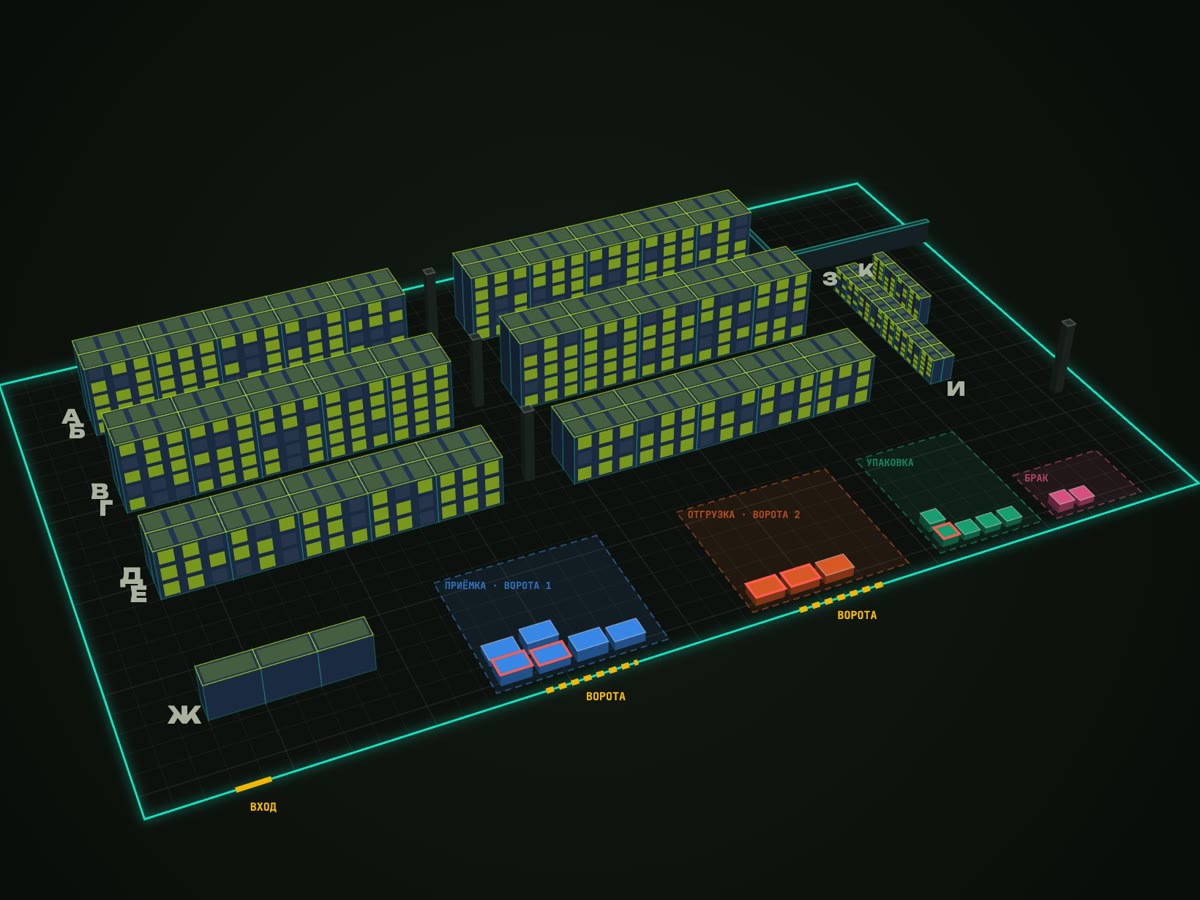
The warehouse map is a window on top of a warehouse system. The warehouse is drawn in metres, every rack has its own size and levels, and a click on a shelf shows what is on it and how much. Pickers follow directions on a handheld, managers see a heat map of picks and everything stuck in zones. It is a concept on demo data — you can play with it below.
Challenge
A warehouse with a thousand cells where everything is “somewhere here”. Only one or two people know where items are; a new picker spends tens of minutes looking for a shelf.
Spreadsheets and a chart on the wall show neither the shelf nor that an order has been waiting at packing for an hour. The manager learns about it when the customer calls.
Solution
You draw the warehouse yourself: walls snap together, every rack has its own width, depth, height, levels and cells. An address like A3B2 is fixed to the shelf and printed on a barcode label.
The map shows stock by cell: click a rack to see its levels, click a cell to see items and quantities. A scanner or search highlights where an item is.
Pickers get tasks on a handheld: where to go in words and on a mini-map, scan the cell, scan the item, confirm the quantity. Wrong shelf — the handheld says so at once.
Receiving, packing and shipping zones show what is waiting and for how long, and analytics shows where people walk most and what to move closer to the exit.
What's next
The window does not change stock — the warehouse system does; the window only shows and suggests. So the map plugs into existing accounting without rework: we are preparing it for the Parthold warehouse platform.
Spin the warehouse yourself
A 3D warehouse on demo data: click a rack to open its shelves and items. Turn on the heat map, run a picker route or “beep” an item with the scanner.
Open the live demo →ITKILLER concept · demo data · the story in the video is fictional
What's inside
Click and see the shelf
A rack front by level; each cell shows items, barcodes and quantities from the warehouse system.
Draw your own warehouse
Walls snap together, racks of any size, checks for aisle width and reachability from the entrance.
Beep and find
A scanner or search by name, barcode or address highlights every cell holding the item.
Picker handheld
Step-by-step tasks: directions in words and on a mini-map, scan cell and item, shortages, hand-off to packing.
Zones and statuses
Receiving, packing, shipping — with your own names, statuses and time limits. You see what is stuck.
Heat map
Where people pick most, how far pickers walk a day and what to move closer to the exit.
Stack
- План в метрах
- 2D и 2,5D без библиотек
- Фасады стеллажей
- Сетка проходимости
- A* и 2-opt
- Подсказки словами
- ABC-анализ
- Тепло подборов
- Перестановки
- REST и WebSocket
- Code 128 и EAN-13
- Роли и ТСД